If your business already uses Accurate Online for bookkeeping, the next question is almost always the same: which POS app connects directly to Accurate? Without an integration, daily sales have to be exported from the POS and typed in again. For cafés and restaurants with hundreds of sales a day, that is tiring and error-prone work.
ZyncPOS is an iPad POS that integrates directly with Accurate Online. Every transaction at the register reaches Accurate in real time, so your financial reports always match what happens at the counter.
What Flows into Accurate Online Automatically?
As soon as a sale is paid at the ZyncPOS register, the following is recorded in Accurate Online with no manual entry:
- Sales invoices. Every POS transaction is created as a sales invoice in Accurate.
- Sales receipts. The payment taken at the register is recorded as a receipt, so the invoice is marked as paid right away.
- Accurate dashboards fill in. Widgets such as Revenue, Sales Trend, Cash Flow, and Profit & Loss reflect your outlet's sales immediately.
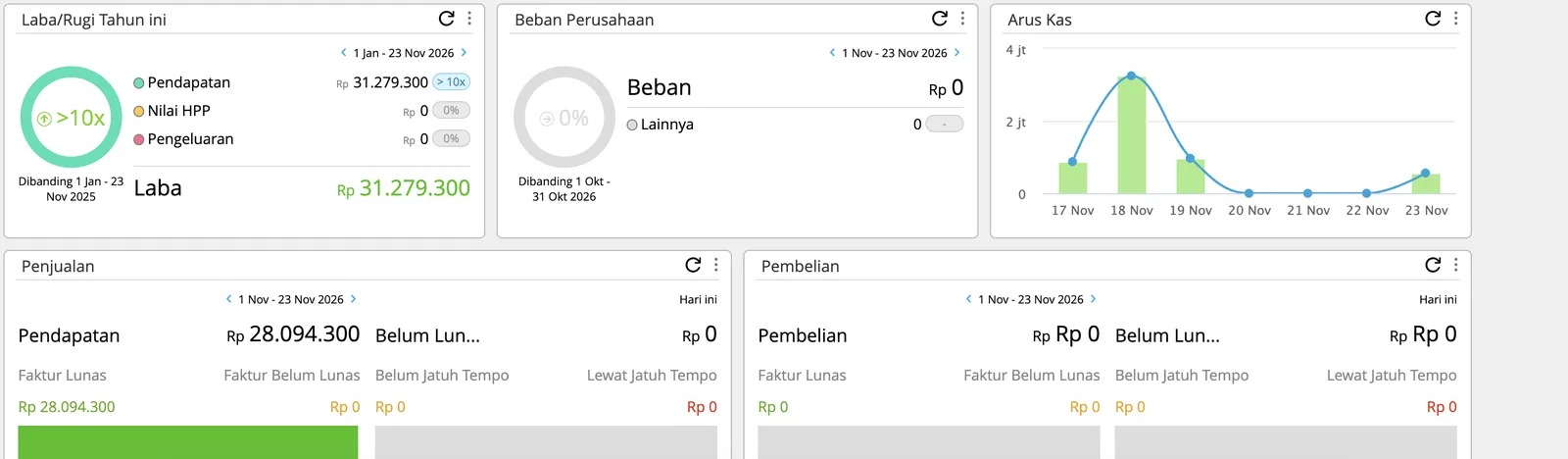
Why Real-Time Integration Matters
- No retyping. Your admin team no longer copies daily summaries from the POS into Accurate.
- Fewer errors. The numbers in Accurate come straight from transactions, not from manual entry.
- Always-current reports. Owners can open Accurate at any time and see today's sales, not last week's.
- Faster month-end close. Your accountant only needs to review and post adjustments.
Who Is It For?
- Cafés and restaurants already on Accurate Online that don't want to switch accounting software.
- Businesses supported by an accountant or tax consultant who already works in Accurate.
- Multi-outlet businesses that want every branch's sales in one accounting system.
How to Get Started
- Prepare your Accurate Online account and tidy up your chart of accounts (revenue, cash, bank, tax) with your accountant.
- Connect ZyncPOS to Accurate. The ZyncPOS team guides you through the connection and account mapping.
- Pick a start date, such as the first of the month, so no sale is recorded twice.
- Start selling. Every POS transaction appears in Accurate Online automatically.
Frequently Asked Questions
Do transactions reach Accurate in real time?
Yes. Every completed sale at the ZyncPOS register is recorded in Accurate Online right away as a sales invoice and receipt.
Do I have to move away from Accurate?
No. You keep using Accurate Online for bookkeeping and financial reports. ZyncPOS is the POS that sends sales data to it.
What if the internet goes down at the outlet?
The ZyncPOS register keeps selling offline. Once the connection is back, transactions sync and are sent to Accurate.
I don't have accounting software yet. What are my options?
You can use ZyncAccounting, the accounting module built into ZyncPOS.
Conclusion
If you are looking for a POS app integrated with Accurate Online, ZyncPOS puts your outlet's sales straight into your books, in real time and with no retyping. Also read how to prepare before connecting ZyncPOS to Accurate Online and see our other integrations on the ZyncPOS Integrations page.